Copilot sovereignty myths for regulated enterprises
Where Microsoft 365 Copilot helps, where sovereignty claims get fuzzy, and when customer-controlled private AI is a different requirement.
Microsoft 365 Copilot is a serious enterprise product. Dismissing it as a toy is lazy and commercially unserious. For many teams, it is the fastest path to AI inside the tools they already use. It inherits Microsoft 365 identity and permissions, connects to Microsoft Graph, fits existing productivity workflows, and comes with enterprise data protection commitments that matter to buyers.
The mistake is different: treating Copilot as proof that every regulated AI problem is solved. Copilot answers a Microsoft 365 productivity question. It does not automatically answer a customer-controlled VPC question, a custom RAG evaluation question, a deployment evidence question, or a data-boundary question for documents and workflows that live outside Microsoft 365. Regulated buyers need to separate those categories before they choose a platform.
Microsoft's own documentation is useful here because it is precise. Its enterprise data protection page says prompts and responses are protected by Microsoft 365 commercial commitments, that Copilot respects identity and permissions, and that prompts, responses, and data accessed through Microsoft Graph are not used to train foundation models. It also notes that web queries have separate handling and that specific controls vary by subscription. Read the current Microsoft Learn pages on enterprise data protection and Copilot privacy.
Those commitments are strong. They are also not the same thing as "runs in your VPC." A buyer who needs the latter should say so explicitly instead of arguing about slogans.
Myth 1: If prompts are not used for training, sovereignty is solved
Not using prompts and responses to train foundation models is important. It is not the whole sovereignty problem. Sovereignty for a regulated enterprise is about who controls infrastructure, network paths, operational logs, release change, model selection, data residency, evidence export, support access, and the consequences of a dependency outage.
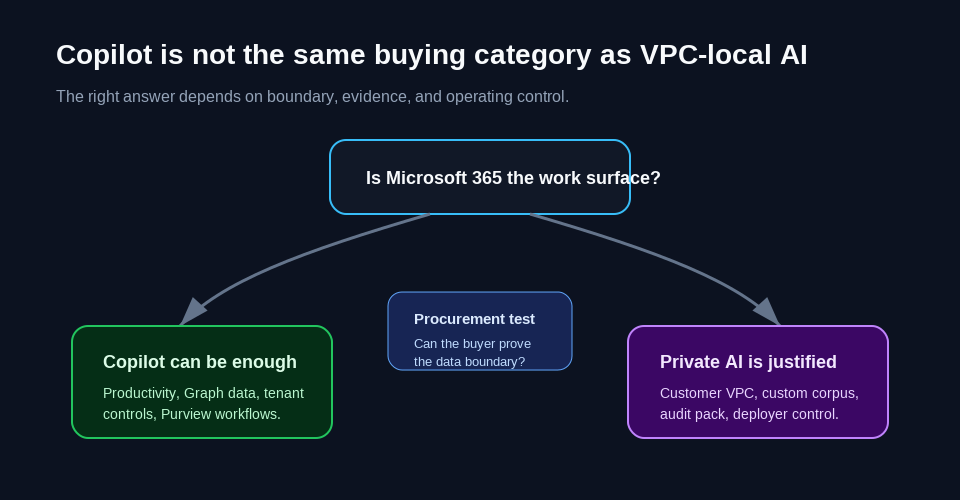
If a customer is comfortable with Microsoft 365 as the system boundary, Copilot may be enough. That can be true for productivity assistance, meeting summaries, email drafting, and search over Microsoft 365 data where the organisation has already invested in Purview, sensitivity labels, retention, and permission hygiene.
If the customer asks for customer-owned infrastructure, no prompt or document egress from a private network, custom model hosting, collection-level audit exports, deployment-local compliance packs, or direct control over retrieval indexes, then the requirement has moved. The buyer is not asking for "Copilot but smaller." They are asking for a different operating model.
That is why Retvest's positioning is deliberately narrow: private AI for regulated enterprises where customer content stays in the customer environment. It does not try to replace Microsoft 365. It tries to solve the part of the buyer conversation where "covered by enterprise terms" is not the same as "deployable inside our boundary."
Myth 2: Permissions inheritance guarantees safe retrieval
Permission inheritance is a strong default when the content already lives in Microsoft 365 and the tenant has clean permission hygiene. It can also expose old information architecture problems. If a SharePoint site, Teams channel, or OneDrive folder is over-shared, an AI layer can make that latent access problem more visible and easier to exploit accidentally.
This is not a Copilot-specific criticism. Every retrieval system has the same failure mode. The difference is where the boundary is enforced and how easily the operator can prove it. In a private RAG system, retrieval should be scoped before search, not filtered after answer generation. Document ACLs, collection membership, group sync, explicit exclusions, and revocation checks should affect which chunks are even eligible for retrieval.
For regulated deployments, the permission story needs evidence:
- A user who loses access to a collection cannot retrieve its chunks.
- A moved document updates vector payloads and search filters.
- A deleted or superseded document cannot remain in dense retrieval under the old scope.
- A shared conversation thread does not grant access to underlying documents.
- Audit records show bounded identifiers and counts without leaking document text.
That evidence is what procurement and security teams need when the pilot moves from a friendly demo to a real deployment review.
Myth 3: EU Data Boundary means all AI risk is regional
Regional processing matters, but geography is not a complete architecture. A European data boundary is about where certain data is processed and stored under defined service commitments. A private deployment boundary is about who owns and operates the runtime, the network, the database, the vector index, the model endpoint, the observability plane, and the evidence export.
Microsoft documents that Microsoft 365 Copilot has EU Data Boundary commitments for EU users, while also documenting exceptions and subscription-dependent controls. A regulated buyer should read those details rather than reduce them to "EU or not EU." The same discipline applies to any vendor. Scaleway, OVHcloud, hyperscalers, and private deployments all have different shared responsibility models.
The practical question is not "Is the vendor European?" It is:
- Can the customer prove where prompts, answers, documents, embeddings, logs, metrics, and audit events go?
- Can the customer disable public endpoints or force private networking?
- Can the customer run the workload in its chosen region?
- Can the customer rotate secrets, revoke sessions, and verify release signatures?
- Can the customer export evidence without asking vendor support for a custom report?
If the answer is yes inside Microsoft 365, Copilot may be the right product. If the answer must be yes inside the customer's own deployment, private AI is the right category.
Myth 5: A single assistant should serve every workflow
Large enterprises often want one answer because one answer feels easier to govern. In practice, different AI workflows need different boundaries. A meeting summary, a spreadsheet helper, a legal precedent search tool, a pharmacovigilance triage assistant, and an internal policy Q&A system should not automatically share the same controls, retention, evidence, or deployment pattern.
Copilot is well placed for many productivity workflows because those workflows already live in Microsoft 365. A private RAG system is better placed when the workflow needs a curated corpus, deployment-local evidence, or a model endpoint that sits inside a customer-controlled network. A custom high-risk workflow may need something stricter again: formal conformity assessment, model validation, human oversight procedures, and regulator-facing documentation.
The procurement mistake is trying to force all of those into one product category. The architecture mistake is letting a convenient assistant reach into content or decisions that need stronger controls. The better pattern is a tiered AI portfolio. Use Microsoft 365 Copilot where its boundary and controls match. Use private RAG where customer-owned knowledge evidence matters. Use bespoke governed workflows where the AI Act or sector regulation demands a formal control system. This framing also makes budgeting clearer because each tier can be approved against the evidence burden it actually carries.
Myth 4: Copilot makes vertical RAG unnecessary
Copilot can be excellent for general productivity and Microsoft 365 knowledge work. Vertical RAG is still useful when the buyer needs a curated corpus, explicit citations, custom ingestion rules, domain-specific evaluation, and auditable retrieval quality. A legal, life-sciences, or financial-services team often cares less about "Can the assistant summarise this email?" and more about "Can it answer from this approved corpus, cite the correct source, refuse stale material, and show an audit trail?"
That is a narrower product, but narrow is the point. A private RAG system can make different tradeoffs:
- Index only approved sources instead of every accessible work artifact.
- Keep prompt and answer retention separate from business-document retention.
- Measure recall, faithfulness, citation accuracy, and latency against a golden set.
- Make compliance export a product feature rather than an afterthought.
- Support customer-owned model endpoints and deployment-specific runbooks.
Those capabilities do not mean Copilot is weak. They mean the workflow has moved from productivity assistant to controlled knowledge system.
How to choose without politics
The clean way to decide is to write the boundary requirement in one paragraph. If the paragraph says "employees need help drafting, searching, and summarising inside Microsoft 365 with existing tenant controls", start with Copilot. If the paragraph says "regulated documents must stay in our VPC, retrieval must be collection-scoped, logs must be content-minimised, and compliance evidence must be exportable from our deployment", evaluate private AI.
The buying process should then ask for proof, not assurances:
- Show a permission revocation test.
- Show a no-egress network diagram.
- Show the audit event for a query without raw prompt content.
- Show the compliance export.
- Show model and retrieval configuration versioning.
- Show failure behaviour when the LLM backend is unavailable.
- Show the rollback path.
This is where Retvest wants to compete. Not as a prettier chat surface, and not as a Microsoft replacement. The useful wedge is customer-controlled private AI for teams that cannot ship regulated knowledge work on trust-me architecture.
Sources checked
- Microsoft Learn: Enterprise data protection in Microsoft 365 Copilot
- Microsoft Learn: Data, privacy, and security for Microsoft 365 Copilot
- Retvest AI: Trust page